

Track who has opened and replied
All plans
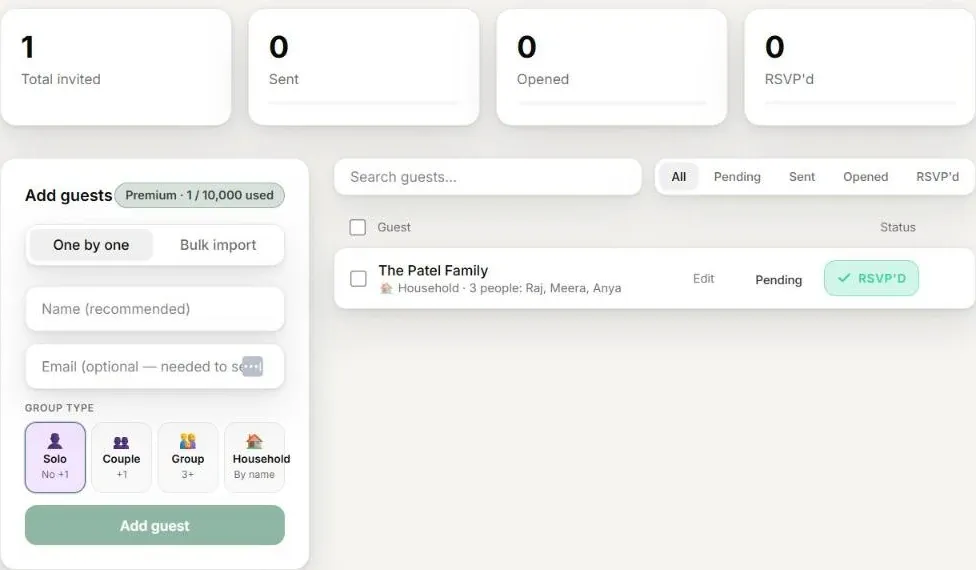
Open your event and click Guest List. The counters at the top show how many invitations are Sent, Opened and RSVP’d. Use the filters above the list to see exactly who is at each stage.
Video transcript
Here's how to send personal email invitations, so you know who's opened them and replied.
Open your event and click Guest List. Add a guest's name and email, then choose who's invited: just them, a couple, a group, or a whole household.
For a household, list everyone by name and tick Child for children. Each person can say whether they're coming.
Got a long list? Switch to Bulk import and paste one guest per line. Names without an email become walk-in guests.
Then click Send all pending. Each guest gets their own link, and the counters show how many invitations were sent, opened and answered.
You can invite up to 20 guests per event on Free, 1,000 on Pro and event passes, and 10,000 on Premium.
You'll find the step-by-step guide at help.rsvpingo.com.
What each status means
Section titled “What each status means”| Status | Meaning |
|---|---|
| Pending | Added to your list, but no invitation has been sent yet |
| Sent | The invitation email has gone out |
| Opened | The guest has opened their invitation |
| RSVP’d | The guest has replied, whether yes or no |
Find guests at each stage
Section titled “Find guests at each stage”- Click a filter (All, Pending, Sent, Opened or RSVP’d) to narrow the list.
- Type in Search guests… to find someone by name or email.
- The event Overview shows the same numbers in the Invitations card. Click Manage to jump to the Guest List.
Follow up
Section titled “Follow up”| If guests are… | Try this |
|---|---|
| Still Pending | Click Send all pending |
| Sent but not opened | Check the email address is right, or send them your link by text |
| Opened but not replied | Send a reminder from Emails to guests who Haven’t replied |
Good to know
Section titled “Good to know”- Some email apps open messages automatically or block tracking, so Opened is a good guide rather than an exact count.
- Replies through your shared event link aren’t tied to an invitation, so they don’t move anyone to RSVP’d here. You’ll still see them in your replies on the Overview.