

Change your page's colours, fonts and background
All plans
Open your event, click Website and go to the Design tab. Choose a colour preset or set your own Main and Second colours, pick a font and a background, then click Save.
Video transcript
Here's how to change the look of your event page with templates, colours and fonts.
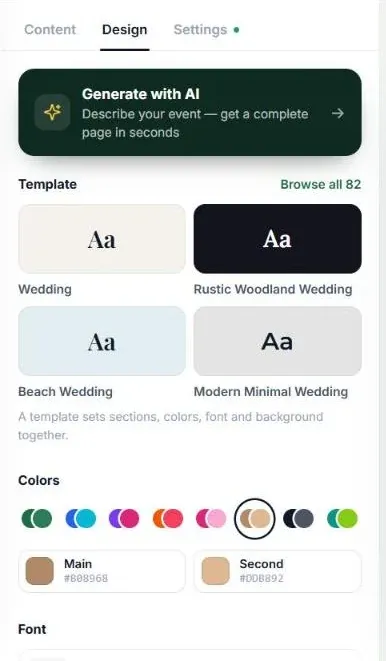
In the Website editor, open the Design tab. A template sets up the sections, colours, fonts and background together.
Browse all 82 templates by category, or search for something specific, like wedding, football or Diwali.
Then fine-tune it. Pick a colour pair, or set your own main and second colours, and choose one of five fonts.
Finish with a background texture, from soft glow and confetti to sparkles and fireworks. Click Save when you're happy.
You'll find the step-by-step guide at help.rsvpingo.com.
Change the look
Section titled “Change the look”-
Open your event and click Website, then the Design tab.
-
Colours: click a preset to use a ready-made pair, or set your own:
- Main colour is used for buttons, headings and highlights.
- Second colour is used for accents and backgrounds.
-
Font: pick one of five fonts: Inter, Montserrat, Playfair Display, Lora or Georgia.
-
Background: choose a texture for the page behind your sections.
-
Check the preview on Desktop and Mobile, then click Save.
Backgrounds
Section titled “Backgrounds”| Style | Backgrounds |
|---|---|
| Plain | None, Soft glow |
| Patterns | Pinstripes, Grid, Wave, Dots |
| Celebration | Confetti, Sparkles, Fireworks, Rainbow, Neon, Pour |
| Seasonal and themed | Autumn leaves, Spooky, Pitch lines |
Font pairings that work
Section titled “Font pairings that work”| Font | Feels |
|---|---|
| Inter | Clean and modern |
| Montserrat | Bold and friendly |
| Playfair Display | Elegant, good for weddings and formal dinners |
| Lora | Warm and classic |
| Georgia | Traditional and easy to read |
Good to know
Section titled “Good to know”- Your colours also style the RSVP form on your page and your separate RSVP link.
- Choose a main colour dark enough for white button text to stay readable.
- Applying a template replaces your colours and fonts with the template’s. Set your own design after you’ve picked a template.