

Get meal counts and a catering sheet
All plans
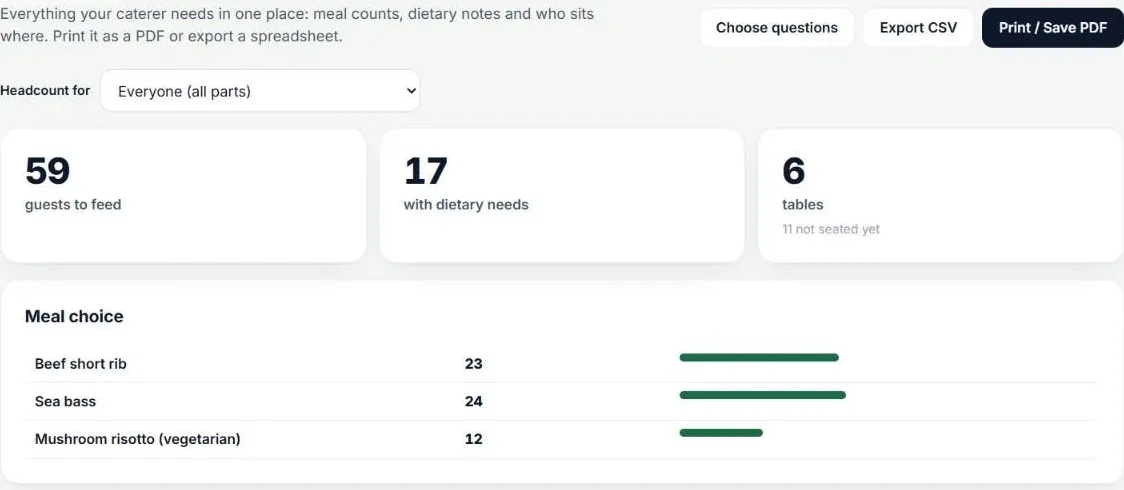
Open your event and click Catering. You’ll see how many guests to feed, your meal choice totals, every dietary need and allergy, and a table-by-table list. Click Print / Save PDF or Export CSV to send it to your caterer.
Video transcript
Here's how to get meal counts and a catering sheet for your caterer.
Open your event and click Catering. You'll see how many guests to feed, how many have dietary needs, and your meal choice totals.
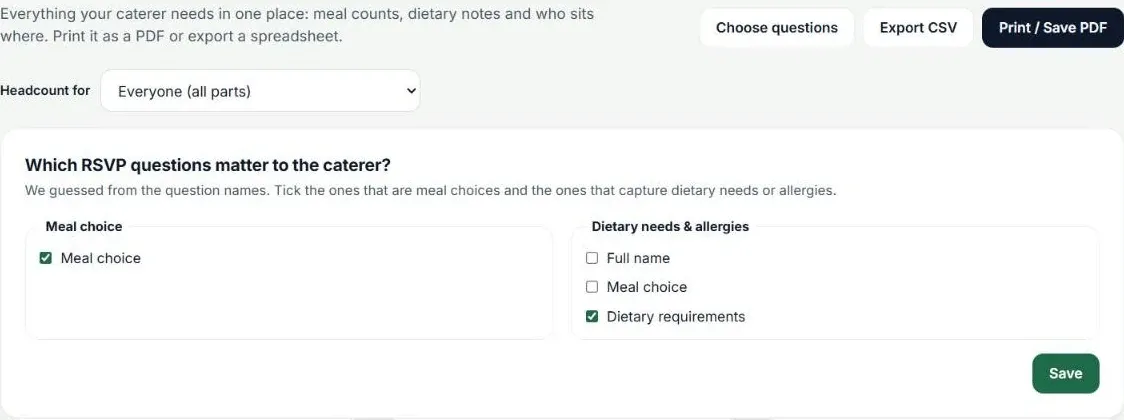
The first time, click Choose questions to tell RSVPingo which answers are meal choices and which are dietary needs.
Every dietary need and allergy is listed by guest, with their table once you've made a seating chart.
When you're ready, click Export CSV for a spreadsheet, or Print, Save PDF for a sheet your caterer can use. For multi-day events, choose a part under Headcount for.
You'll find the step-by-step guide at help.rsvpingo.com.
Before you start
Section titled “Before you start”The Catering sheet is built from your RSVP answers, so add these to your RSVP form first:
- A meal choice question, such as a Dropdown or Multiple choice with your menu options.
- A dietary needs question, such as Short text with Vegetarian, allergies, anything we should know.
Use the Catering sheet
Section titled “Use the Catering sheet”-
Open your event and click Catering in the menu on the left.
-
The first time, click Choose questions. Tick which questions are meal choices and which capture dietary needs or allergies. RSVPingo makes a first guess from the question names. Click Save.
-
For a multi-day event, use Headcount for to pick one part, such as the Rehearsal dinner, or Everyone (all parts).
-
Click Print / Save PDF for a printable sheet, or Export CSV for a spreadsheet.
What’s on the sheet
Section titled “What’s on the sheet”| Section | Shows |
|---|---|
| Counters | Guests to feed (plus-ones included), how many have dietary needs, number of tables and how many guests aren’t seated yet |
| Meal choice | Totals for each option |
| Dietary needs & allergies | Each guest with a need, their table and what they wrote |
| By table | Each table with every guest’s meal choice and dietary notes |
Good to know
Section titled “Good to know”- The sheet updates as replies come in. Send your caterer the final version after your RSVP deadline.
- Table numbers come from your seating chart. Guests not yet seated show a dash.
- Plus-ones are counted in the headcount. If you need a meal choice for each plus-one, ask for it in your RSVP form.