

Let guests bring a plus-one
All plans
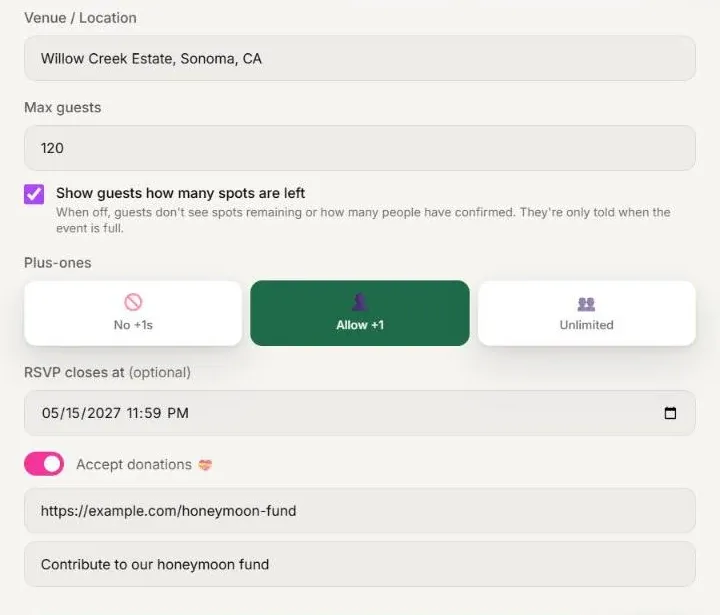
Open your event, click Details, and under Plus-ones choose No +1s, Allow +1 or Unlimited. Click Save. The rule applies to everyone who replies from then on.
Video transcript
Here's how to let your guests bring a plus-one.
In Details, choose how plus-ones work: no plus-ones, one each, or unlimited.
Guests then see an Add plus-one button on the RSVP form, and fill in their guest's details too.
Plus-ones show up under the guest who brought them, and they're counted in your headcount and catering numbers.
You'll find the step-by-step guide at help.rsvpingo.com.
Set your plus-one rule
Section titled “Set your plus-one rule”-
Open your event and click Details in the menu on the left.
-
Scroll down to Plus-ones.
-
Choose one option:
- No +1s: guests can only reply for themselves.
- Allow +1: each guest can add one person to their reply.
- Unlimited: guests can add as many people as they’re bringing.
-
Click Save.
What guests see
Section titled “What guests see”With Allow +1 or Unlimited, the RSVP form shows an Add +1 button. When a guest adds someone, they enter that person’s name and answer your RSVP questions for them. That means each plus-one has their own meal choice and dietary needs.
How plus-ones are counted
Section titled “How plus-ones are counted”- Guest limit. Plus-ones count toward Max guests. A guest who brings someone takes two places.
- Overview. Guests attending includes plus-ones. RSVPs shows how many replies you have, with the number of plus-ones included.
- Catering, seating and check-in. Each plus-one appears with their own meal, gets their own seat next to the guest who brought them, and is marked +1 on the check-in list.
Allow plus-ones for some guests only
Section titled “Allow plus-ones for some guests only”The plus-one rule applies to the whole event. To be strict for most guests but generous for a few, set the rule to No +1s. Then, in Guest List, invite specific people as a couple or a household. A household invite lists everyone by name, and each person ticks whether they’re coming.
Good to know
Section titled “Good to know”- Plus-ones and household invites are included on every plan, including Free.
- Changing the rule doesn’t remove plus-ones from replies you already have.
- Just above Plus-ones, Show guests how many spots are left controls whether guests see the remaining places. When it’s off, guests are only told when the event is full.