

The Website editor at a glance
All plans
Every event comes with its own web page. Open your event and click Website to edit it: build the page from sections on the left, see a live preview on the right, and click Save to put your changes live.
Video transcript
Here's how to build your event page, one section at a time.
Open your event and click Website. Your page is a stack of sections, listed on the left, with a live preview on the right.
Click any section to edit it, like the schedule. Change the heading, times and descriptions, and the preview updates as you type.
To add more, click Add a section and pick one, like a gift registry, a countdown or an FAQ.
Drag sections to change the order, and switch to Mobile to check how it looks on a phone.
Click Save, and this is what your guests see.
You'll find the step-by-step guide at help.rsvpingo.com.
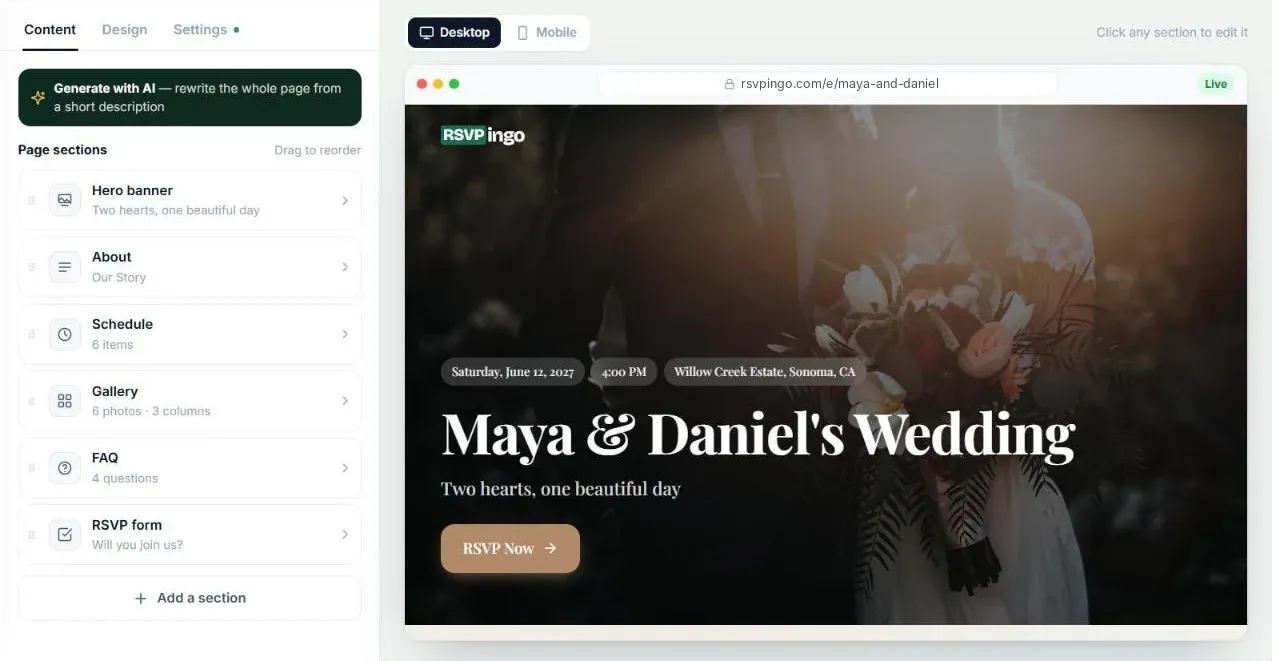
The three tabs
Section titled “The three tabs”| Tab | What you do there |
|---|---|
| Content | Add, edit, reorder and remove the sections of your page, such as the hero banner, schedule, FAQ and gift registry |
| Design | Pick a template, colours, fonts and a background texture, or generate the whole page with AI |
| Settings | Change your page’s web address |
The preview
Section titled “The preview”The right side of the editor shows your page as guests will see it. It updates as you type.
- Click Desktop or Mobile above the preview to switch views. Most guests open invitations on a phone, so check Mobile before you share.
- Click any section in the preview to jump straight to editing it.
- Click Preview in the top bar to open the page full screen in a new tab.
Saving and going live
Section titled “Saving and going live”The top bar tells you where you stand:
- Unsaved changes means your edits are only in the editor. Click Save to publish them.
- All changes saved means the live page matches what you see.
- The Published switch controls whether the page is live at all. Turn it off to take the page back to Draft.
- Public or Private controls who can open it. See Publish your event and set privacy.