

Generate your event page with AI
Premium
Open your event, click Website, go to the Design tab and click Generate with AI. Describe your event, pick a vibe if you like, and click Generate page. You get a complete page with sections, colours, fonts and photos.
Video transcript
Here's how to generate your whole event page with AI.
In the Website editor, open the Design tab and click Generate with AI.
Describe your event: who it's for, what's happening, the schedule and the dress code. RSVPingo already knows the name, date and venue.
Pick a vibe if you like, such as Fun and playful, then click Generate page. Every section gets written, with colours, fonts and photos to match.
Generating replaces your current sections, and you can undo it straight after. The AI page generator is included in Premium.
You'll find the step-by-step guide at help.rsvpingo.com.
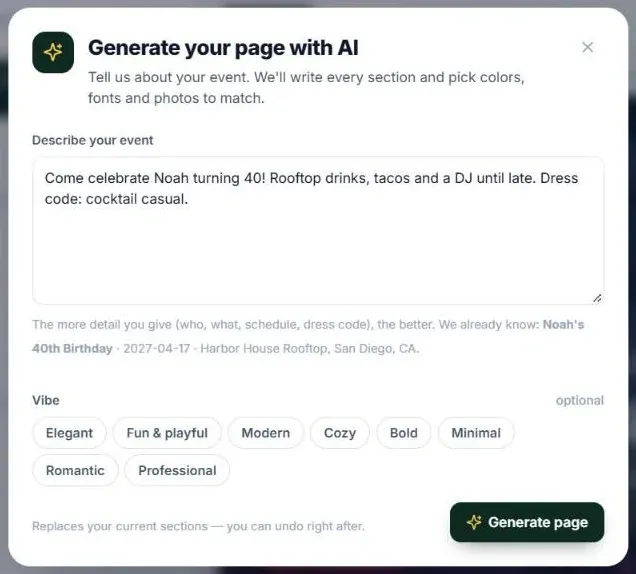
Generate your page
Section titled “Generate your page”-
Open your event and click Website, then the Design tab.
-
Click Generate with AI.
-
Under Describe your event, write a few sentences. Include who it’s for, what’s happening, the schedule and the dress code. RSVPingo already knows your event name, date and venue, so you don’t need to repeat them.
-
Optionally pick a Vibe: Elegant, Fun & playful, Modern, Cozy, Bold, Minimal, Romantic or Professional.
-
Click Generate page. After a few seconds, the preview shows your new page.
-
Read through every section, fix anything that isn’t right, and click Save.
Write a good description
Section titled “Write a good description”The more detail you give, the closer the first draft. Compare:
| Too short | Better |
|---|---|
| Noah’s birthday party | Come celebrate Noah turning 40! Rooftop drinks from 7, tacos at 8 and a DJ until late. Dress code: cocktail casual. Street parking is limited, so take a rideshare. |
Good to know
Section titled “Good to know”- Generating replaces your current sections. If you don’t like the result, click Undo straight after.
- You can generate again as many times as you like with a different description or vibe.
- AI can get details wrong. Always check dates, times and addresses before you share the page.
- The AI page generator is included in Premium. On other plans, start from a template instead.