

Check guests in at the door
All plans
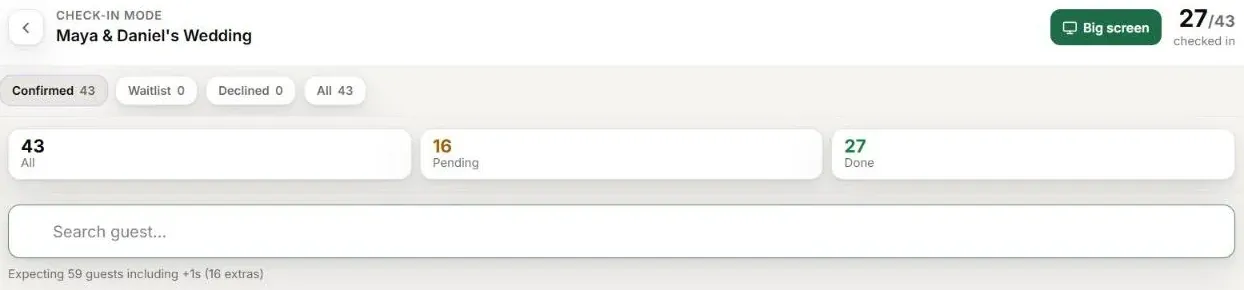
On the day, open your event and click Open door check-in at the bottom of the menu, or Check-in. Search for each guest as they arrive and tap Tap in. The counter at the top shows how many have arrived.
Video transcript
Here's how to check guests in at the door on the day.
On the day, open your event and click Open door check-in, on a phone, tablet or laptop.
Search for each guest as they arrive.
Tap their name to check them in. It turns green with the time they arrived, and the counter at the top goes up.
Tapped the wrong person? Tap again to undo. Several people can check guests in at once, and co-hosts with Check-in only access can help at the door.
You'll find the step-by-step guide at help.rsvpingo.com.
Check guests in
Section titled “Check guests in”-
Open your event on a phone, tablet or laptop and click Open door check-in.
-
Type the guest’s name in Search guest….
-
Tap Tap in on their row. It turns green and shows the time they arrived.
-
Tapped the wrong person? Tap the row again (Tap to undo).
What you see
Section titled “What you see”| Item | Shows |
|---|---|
| Confirmed, Waitlist, Declined, All | Filter guests by their reply |
| All, Pending, Done | How many guests in total, still to arrive, and checked in |
| 27/43 checked in | Your live total in the top corner |
| Expecting 59 guests including +1s | The total headcount, plus-ones included |
Each guest’s row shows +1 if they’re bringing someone, and their table if you’ve made a seating chart.
Let helpers check guests in
Section titled “Let helpers check guests in”Add a friend or venue staff as a Check-in only co-host. They can check guests in and run the big screen, without seeing the rest of your event.
Good to know
Section titled “Good to know”- Several people can check guests in at once on different phones. Everyone sees the same list.
- Walk-ins without an RSVP can be added to your Guest List with just a name.
- Arrivals show on the big screen as guests are checked in.
- After the event, Didn’t show in Emails lets you reach confirmed guests who never checked in.